In short
- Frontier Project Agents help a Program Management Office (PMO) in a large organization: weekly status reports, RAID logs, purchase requests, vendor checks and compliance evidence, all inside Microsoft Teams.
- Ebiz M365 Teams Agent Hub, the Microsoft Teams edition of Agent WorkHub, helps SMEs on Ebiz Suite: the day's figures, reorders, follow-ups and customer replies, prepared in Teams chats for owners and managers to approve.
- One rule: the agent reads only what it is allowed to, writes a draft that cites its sources, and a named person approves before anything happens. Every step is recorded.
- The customer stays in control: agents run under the customer's own Microsoft Entra ID, Microsoft 365 permissions and data policies, and the customer chooses where the AI model runs.
- Built on Microsoft's agent stack: Teams and Adaptive Cards, Copilot Studio and the Microsoft 365 Agents SDK, Microsoft Foundry and Azure OpenAI, Microsoft Graph, Power Automate and Azure.
Part one: overview
First, some plain definitions
An AI agent is a program that uses an AI model to carry out a task with several steps: find the right documents, read them, put the information together and prepare a result, such as a report or an email. Unlike a chatbot that only answers questions, an agent can take actions, which is exactly why it needs clear limits.
Microsoft Teams is the chat and meetings tool most large organizations use, together with Outlook (email), SharePoint (shared documents and lists) and Planner (task boards), all part of Microsoft 365. Copilot Studio is Microsoft's tool for building AI agents that live inside Teams. An organization's Microsoft 365 is called its tenant: its own private space with its own users, data and security rules.
Why bring agents to Teams?
People in banks, government agencies and large companies already spend their day in Teams, so a new separate tool means another login and another window to watch. An agent that lives in the same chat, uses the same sign-in, and respects the same document permissions fits in without changing how people work. A Program Management Office spends much of its week collecting status, chasing RAID logs, comparing quotes and checking vendor documents. Frontier agents take over the chasing and copying, and leave the decisions to people. SME owners and managers increasingly coordinate branches, sales teams, suppliers and resellers over chat too, so the same idea works for them, connected to their Ebiz Suite data.
A week in a PMO with Frontier agents
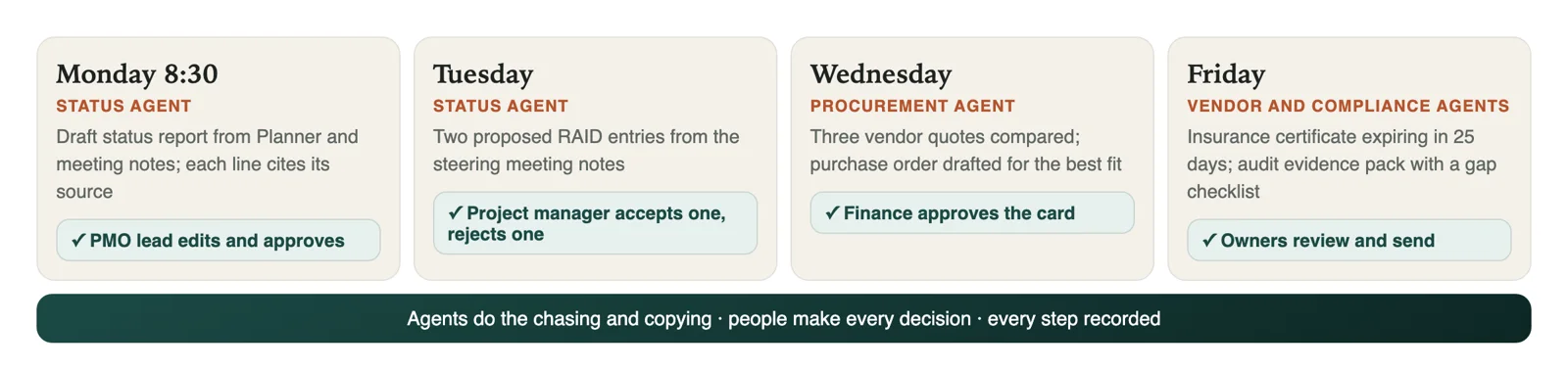
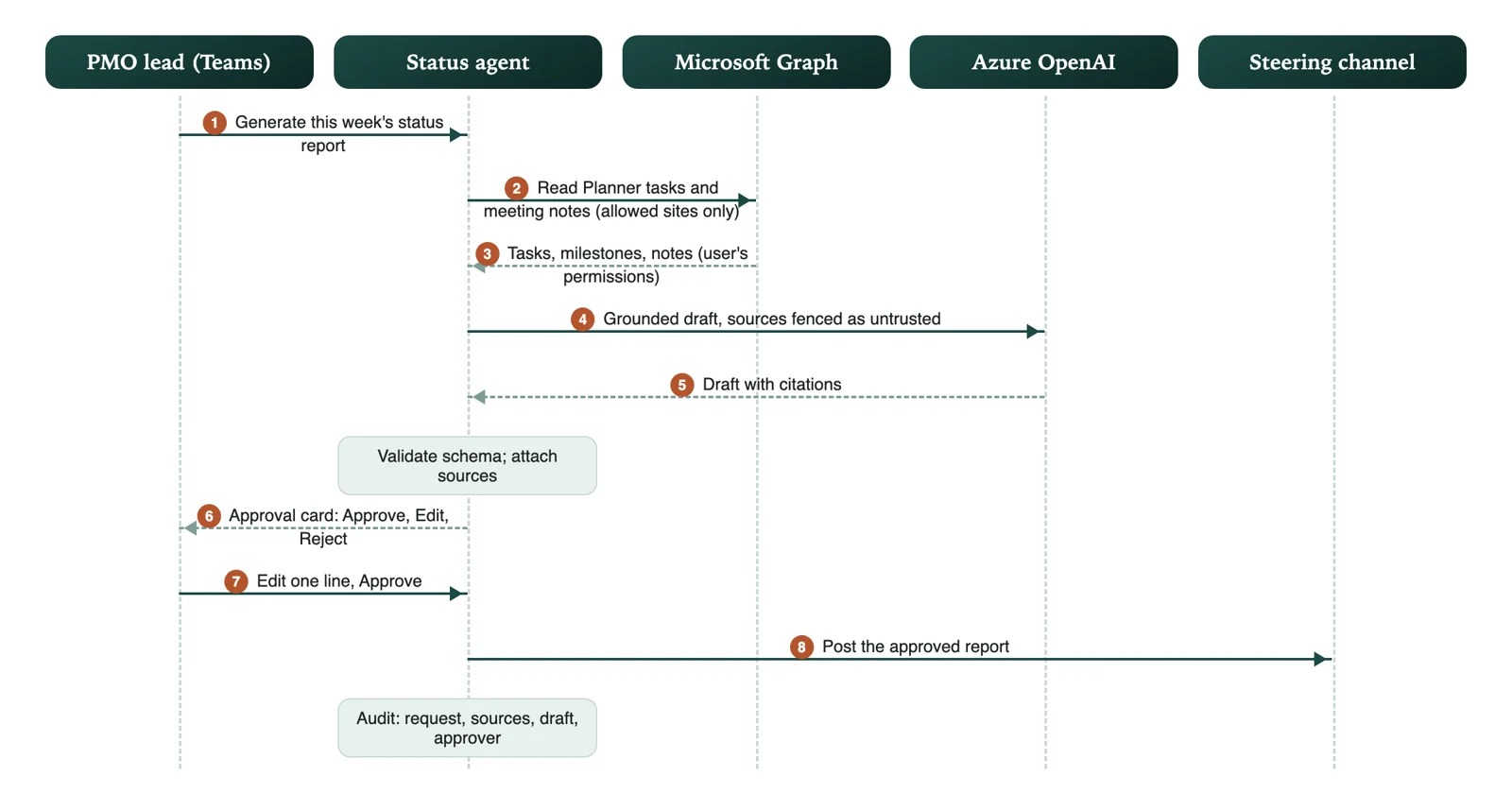
- Monday 8:30. The status agent has read every project's Planner board and last week's meeting notes. In the PMO channel it posts a draft status report: three projects on track, one at risk because a vendor delivery slipped. Each line names the document it came from. The PMO lead edits one sentence and taps Approve; the report goes to the steering committee.
- Tuesday. After the steering meeting, the agent proposes two new entries for the RAID log (risks, actions, issues and decisions) from the meeting notes. The project manager accepts one and rejects the other.
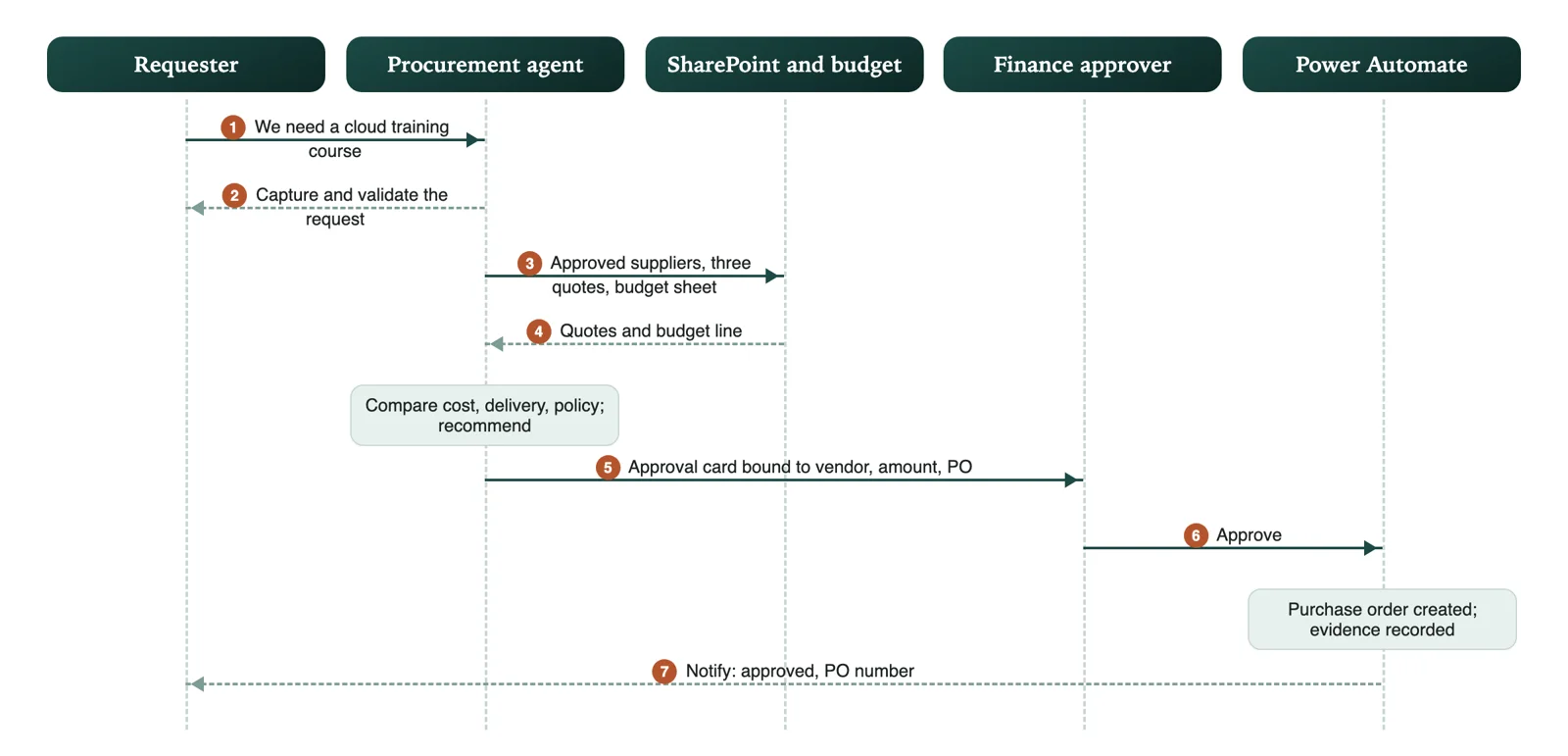
- Wednesday. A team requests a cloud training course. The procurement agent compares three vendor quotes from the shared folder, highlights the differences, and drafts a purchase order for the recommended one. Finance approves the card in Teams.
- Friday. The vendor agent flags that one vendor's insurance certificate expires in 25 days and drafts a reminder email. The compliance agent collects evidence for an audit request into one folder, with a checklist of what is still missing.
The approval rule
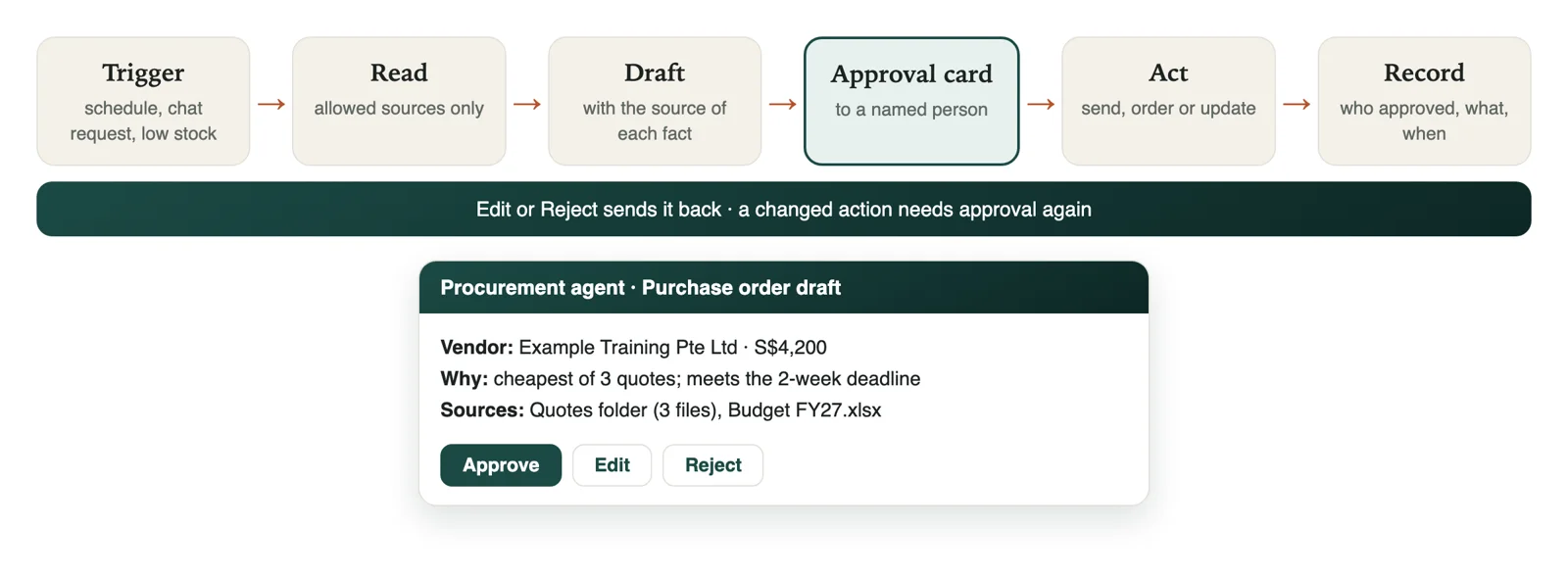
Every agent task follows the same steps, and nothing reaches "Act" without passing the approval card. The card shows the sources, so the approver checks facts instead of trusting the AI. If anyone changes the proposed action, it needs approval again.
What the customer gets
- Less chasing, faster reporting: status packs, RAID updates and evidence packs drafted from the systems the team already uses.
- Decisions stay with people: every send, purchase and record change is approved on a card, by a named person.
- Answers you can check: every draft cites its sources, and the compliance agent separates facts from interpretation.
- Nothing moves out: sign-in, data, labels and retention stay in the customer's Microsoft 365.
- Choice of AI model: Microsoft Foundry and Azure OpenAI by default, or the customer's own approved provider.
- Bounded cost: AI use metered per team and agent, with limits.
Part two: Product 1, Frontier Project Agents
1. Scope
Frontier Project Agents is a Microsoft Teams-first operations product with specialized AI agents for project management, procurement, vendor management, compliance and operational governance. Agents retrieve authorized information, prepare grounded recommendations, coordinate workflows and request approval before sensitive actions. It is an independent product, separate from Ebiz Suite and Agent WorkHub, and the foundation that Product 2, Ebiz M365 Teams Agent Hub, builds on (part three).
2. Use cases
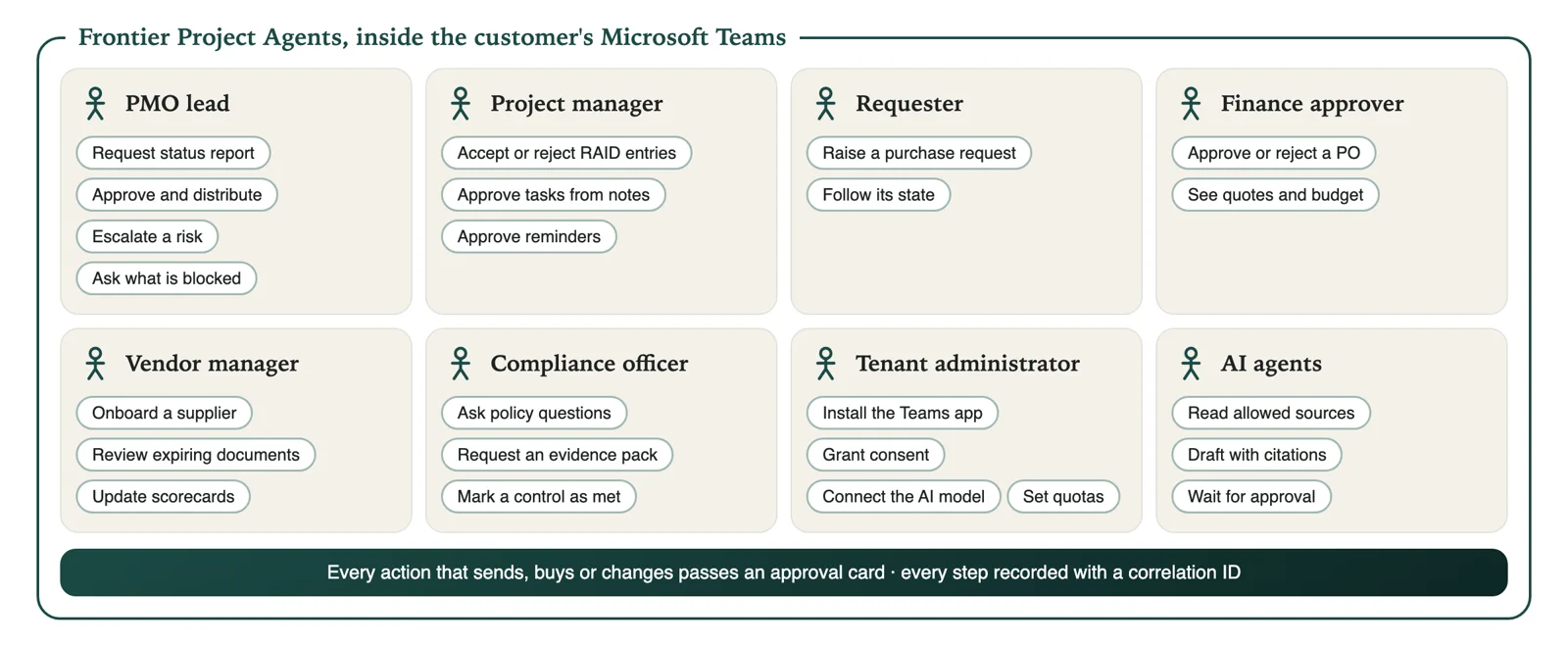
- PMO lead: request and approve the weekly status report, escalate a risk, ask what is blocking a project.
- Project manager: accept or reject proposed RAID entries, approve tasks and reminders drafted from meeting notes.
- Requester: raise a purchase request in chat and follow its state.
- Finance or budget approver: approve or reject a purchase order on the card, with the quotes and budget shown.
- Vendor manager: onboard a supplier with a checklist, review expiring documents and scorecards.
- Compliance officer or auditor: ask policy questions with citations, request an evidence pack, mark a control as met.
- Tenant administrator: install the Teams app, grant consent, connect the AI model, assign models to agents, set quotas.
3. The five agents
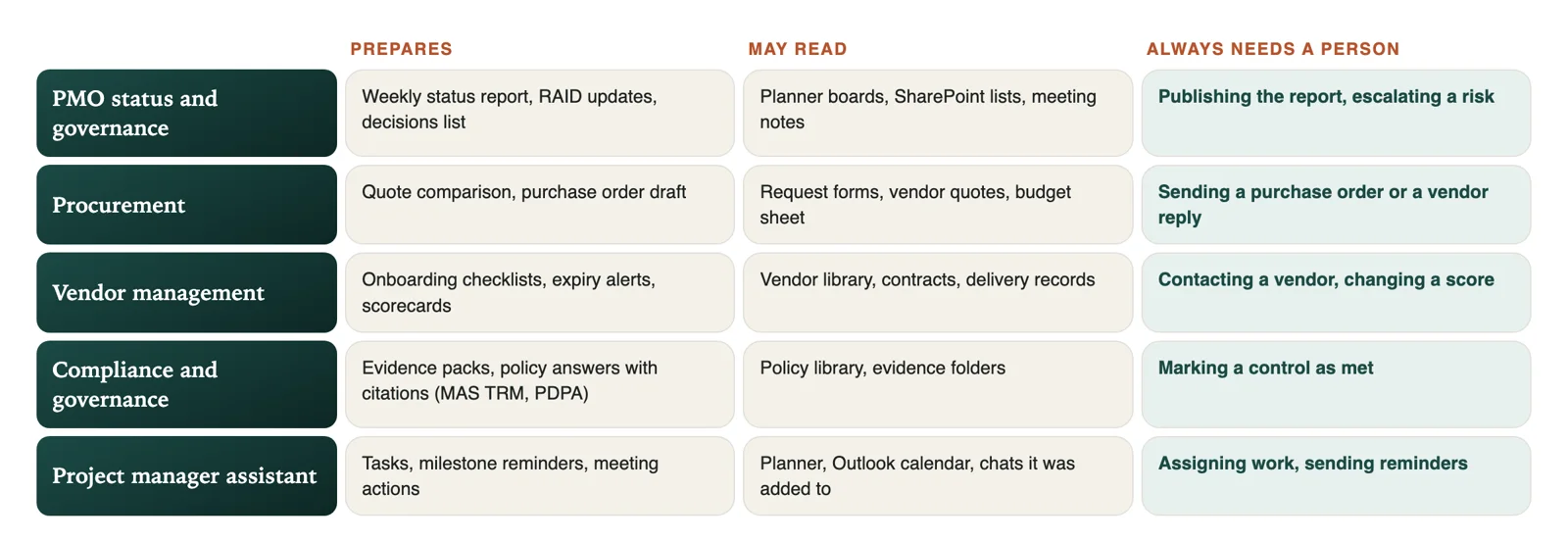
- PMO status and governance agent: reads project tasks and milestones from authorized Planner and SharePoint sources; identifies overdue tasks, dependencies and risks; generates weekly status reports and RAID logs; prepares executive summaries with source references; requests approval before distributing reports. *Example: "Generate this week's status report for Project Phoenix."*
- Procurement agent: captures and validates purchase requests; retrieves approved suppliers and quotations; compares cost, delivery and policy criteria; recommends a supplier with an explanation; requests manager approval, drafts the purchase order and records the evidence. *Example: "We need 20 laptops under S$30,000."*
- Vendor management agent: onboards suppliers with controlled checklists; tracks insurance and certificate expiry; maintains performance notes and scorecards; notifies owners about missing documents and renewals; flags risks and recommends escalation. *Example: "Which vendors have compliance documents expiring within 30 days?"*
- Compliance and governance agent: answers policy questions from authorized SharePoint documents, with citations, and distinguishes facts from interpretation; tracks policy owners, review dates and evidence for frameworks such as MAS TRM and PDPA; identifies missing evidence and gaps; escalates ambiguous questions to people. *Example: "Can employees use public AI tools for confidential documents?"*
- Project manager assistant: summarizes authorized meeting transcripts; extracts proposed actions, owners and dates; creates Planner tasks after confirmation; finds blockers and unresolved decisions; prepares agendas, reminders and draft messages. *Example: "What is blocking the CRM migration?"*
4. Cross-agent workflow
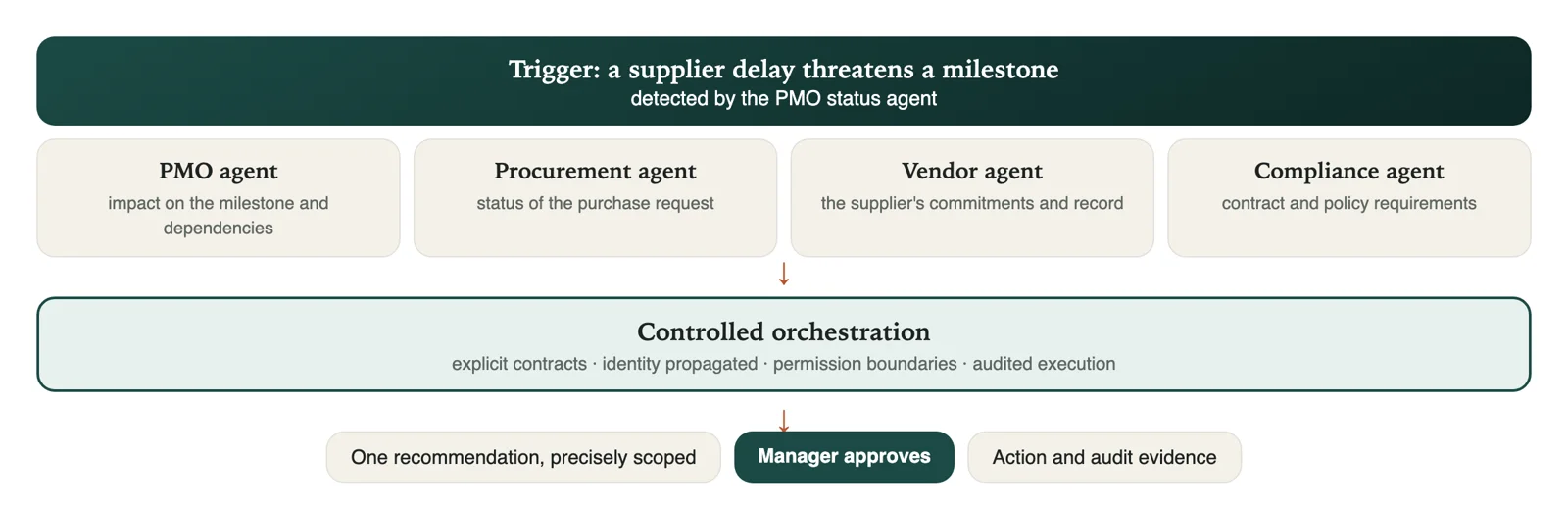
A supplier delay threatens a project milestone. The PMO agent identifies the risk; the procurement agent retrieves the request's status; the vendor agent checks the supplier's commitments; the compliance agent verifies the relevant requirements; orchestration consolidates the recommendations; and the manager approves one precisely scoped action. Cross-agent calls use explicit contracts, identity propagation, permission boundaries and auditable execution: controlled orchestration, not unrestricted agent autonomy.
5. Logical architecture
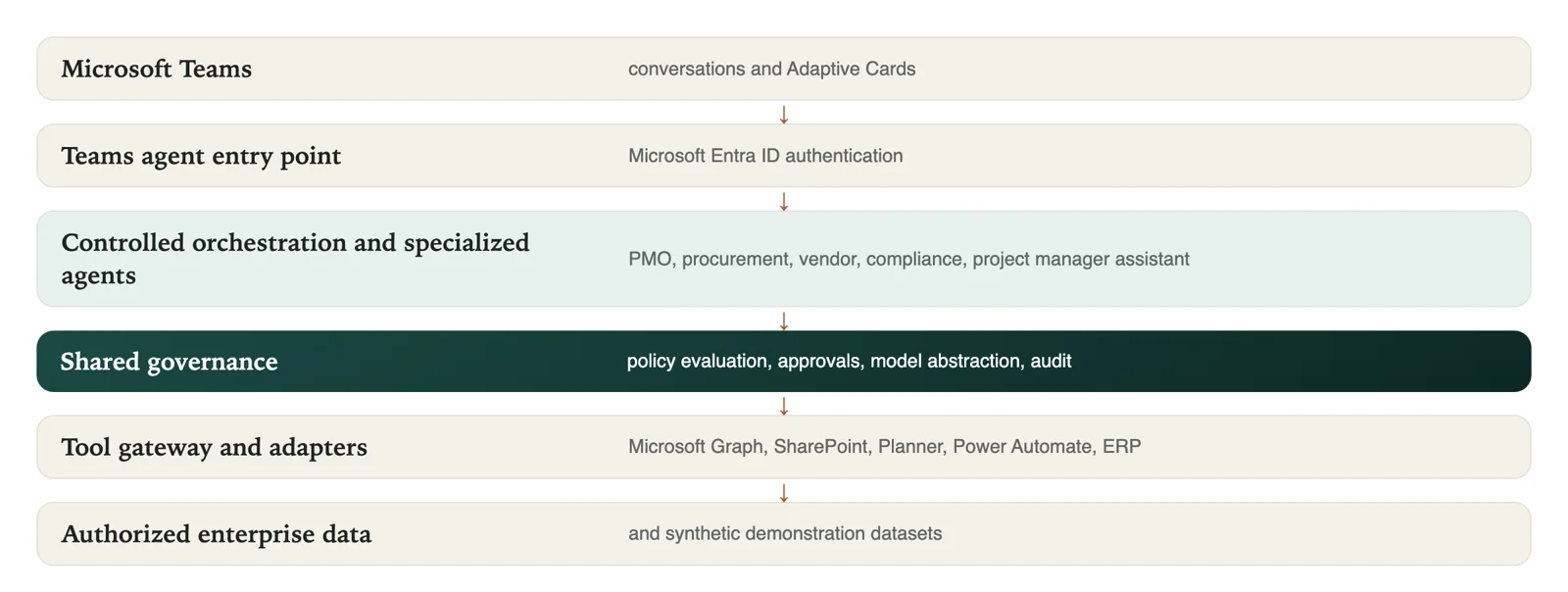
Requests enter through the Teams agent entry point with Microsoft Entra ID authentication, pass to controlled orchestration and the specialized agents, and reach data only through a tool gateway of adapters for Microsoft Graph, SharePoint, Planner, Power Automate and an ERP. The compliance agent gives business-facing compliance help; platform-wide policy enforcement sits in the shared governance layer, where no agent can bypass it.
- Microsoft Entra ID: the organization's own sign-in; agents act as known users and apps under the company's existing security rules.
- Microsoft Graph: the single doorway to SharePoint documents, Planner tasks, Outlook mail and calendars, with permissions checked on every request.
- Copilot Studio and the Microsoft 365 Agents SDK: where agents are designed: low-code business agents in Copilot Studio, and pro-code TypeScript agents with the SDK for custom logic.
- Microsoft Foundry and Azure OpenAI: the AI models, run under the customer's agreement and answering only from allowed sources.
- Power Automate and Adaptive Cards: the approval step: a card in Teams with Approve, Edit and Reject, and the workflow continues only on Approve.
- Dataverse: business records such as purchase requests, approvals and audit events.
6. How each agent is engineered
Each agent is specified before it is built: a documented role, system instructions, a tool allowlist, an input and output schema, an autonomy boundary, approval gates, failure handling, telemetry and an evaluation suite. The model layer has a configurable model, token and cost monitoring, timeouts, retries, structured output validation, and fallback only to approved providers.
- Grounded answers (RAG): ingestion, extraction and metadata; permission-aware retrieval; source attribution; grounded generation; and retrieval evaluation. Retrieval starts with Microsoft Graph and SharePoint search, with Azure AI Search added only where it is justified.
- Safe actions: every external action carries validated parameters, a correlation ID, idempotency where it applies, and structured errors.
- Two tracks, one set of scenarios: low-code agents in Copilot Studio with Power Automate, and pro-code TypeScript agents with APIs and orchestration, sharing the same synthetic data and evaluation scenarios.
7. Approval lifecycle
Request, agent analysis, proposed action, policy evaluation, approval card, human decision, execution or stop, audit evidence, and user notification. Approval is bound to the exact action, amount, target and parameters; a changed action needs new approval.
8. Data entities
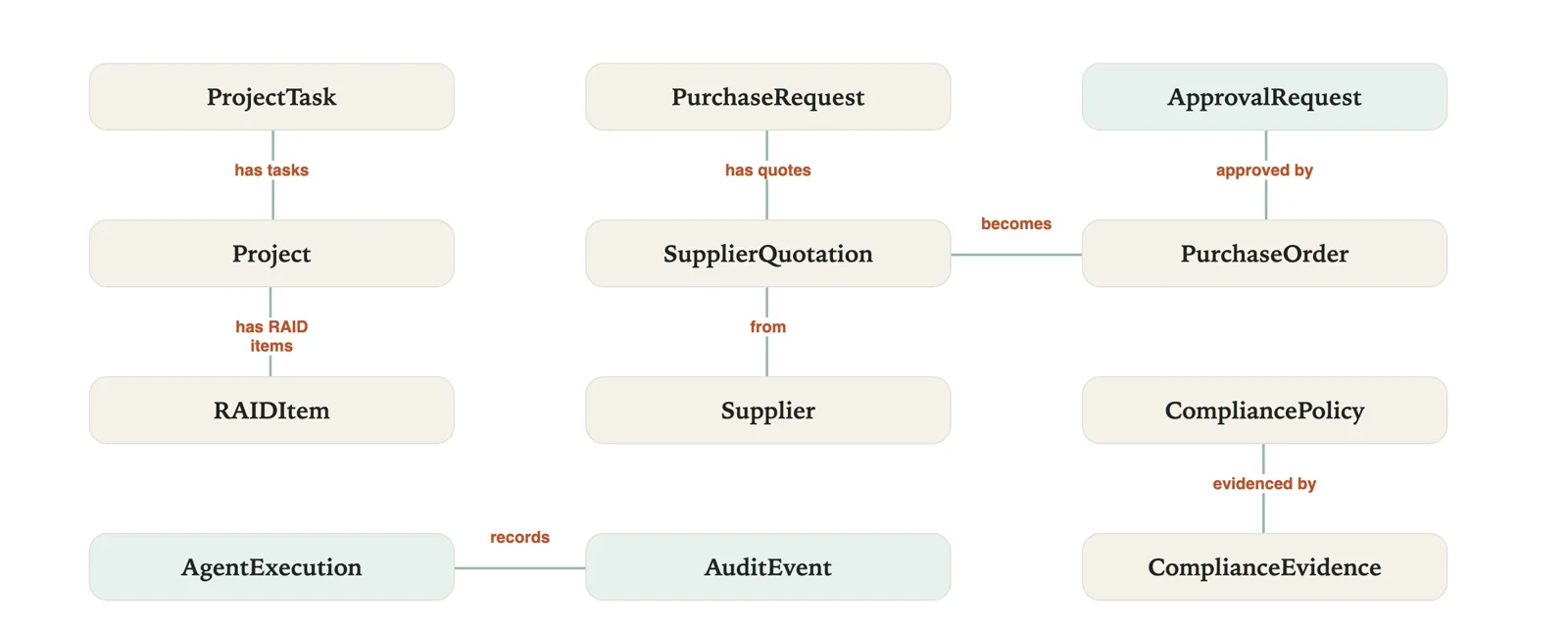
- Project and ProjectTask: project metadata, tasks and milestones.
- RAIDItem: risks, actions, issues and decisions.
- PurchaseRequest and SupplierQuotation: purchasing and supplier quotes.
- Supplier and PurchaseOrder: the vendor master and approved orders.
- ApprovalRequest: approval state, bound to the exact action and parameters.
- CompliancePolicy and ComplianceEvidence: policy and evidence metadata.
- AgentExecution and AuditEvent: traceability and operational records.
9. Integration design
- Microsoft Graph: authorized Microsoft 365 resources.
- SharePoint: document retrieval, metadata and source references.
- Planner: task reads and permitted updates.
- Teams: conversations, cards and notifications.
- Power Automate: approved business workflows.
- Business adapter: a mock ERP for demonstrations, behind an extensible enterprise interface.
Every adapter supports mocks, scoped permissions, rate limits, retries, timeouts, idempotency, structured errors and audit events.
Part three: Product 2, Ebiz M365 Teams Agent Hub
10. Scope
Ebiz M365 Teams Agent Hub is the Microsoft Teams edition of Agent WorkHub for SMEs that run on Ebiz Suite, in any industry: distributors, retailers, travel agencies, service firms, schools and more. It belongs to the Ebiz Suite family and builds on Frontier Project Agents' foundations: the same Teams experience, approval rule, governance layer and model choice. Owners, managers, sales and operations staff, and, by mutual consent, trusted suppliers and resellers share Teams chats, and agents work with the business's Ebiz Suite data (sales, customers, stock, bookings and payments).
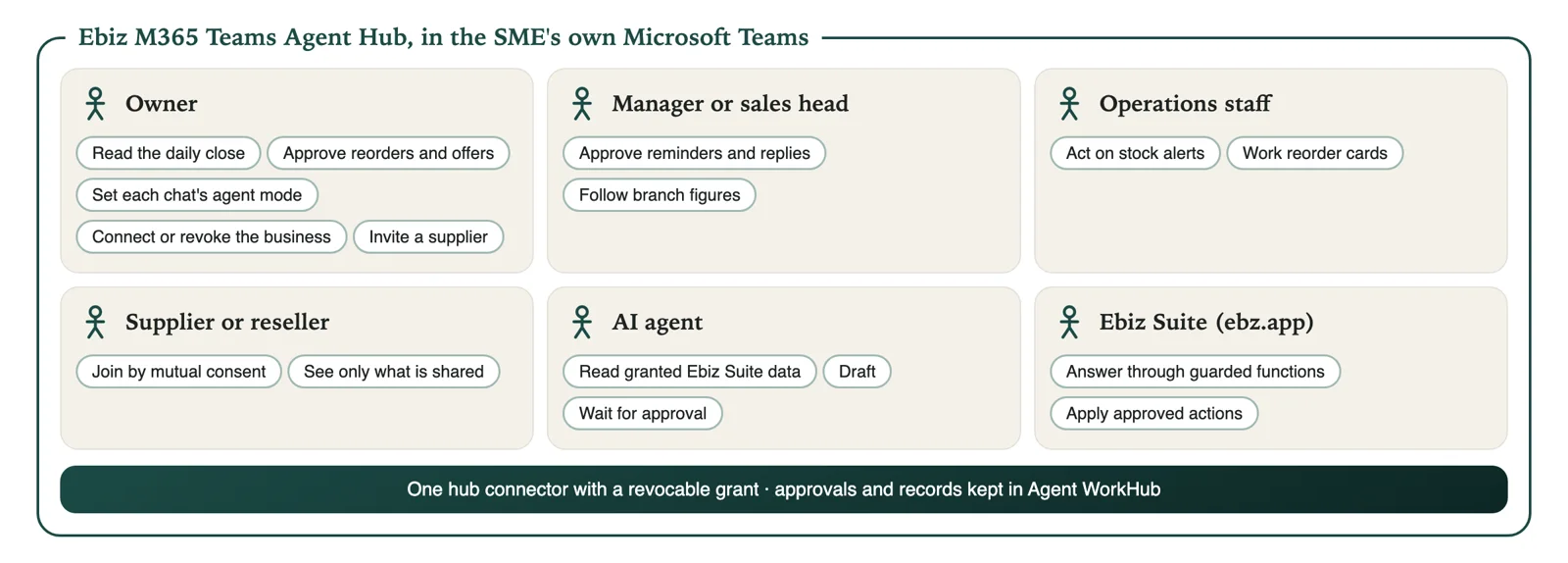
- Owner: read the daily and weekly close, approve reorders and offers, set each chat's agent mode, connect the business to Teams with a revocable permission, invite a supplier or reseller.
- Manager or sales head: approve drafted payment reminders, offers and replies; follow branch figures.
- Operations staff: act on stock alerts and reorder cards.
- Supplier or reseller: join a shared chat only when both owners agree, and see only what the other side chooses to share.
- AI agent: read the business's granted Ebiz Suite data, draft, and wait for approval.
11. What it does
- Daily and weekly close: sales, collections, pending payments and stock alerts, for each branch, posted at closing time with a dashboard link.
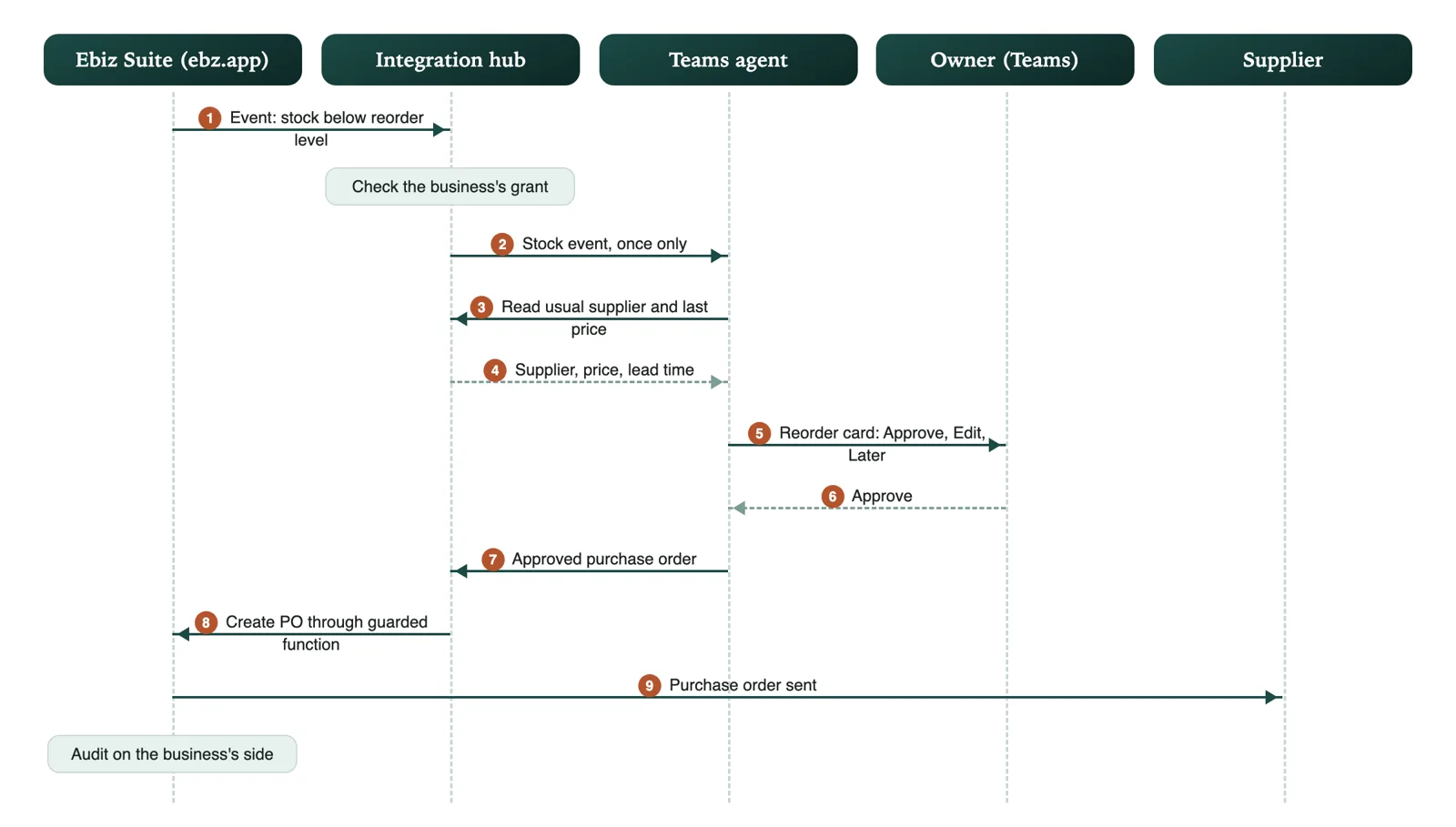
- Reorders: a drafted purchase order to the usual supplier when stock runs low, approved on the card.
- Customer follow-up: enquiries, quotations awaiting reply, overdue balances and complaints summarized, with drafted replies to approve.
- Offers: demand signals, such as enquiries about a trip with seats left, turned into a drafted offer for a manager to edit and approve.
- Agent modes per chat: each chat sets its agent mode: active, on request, or off.
- Supplier and reseller chats on mutual consent: one owner proposes the connection and the other accepts, each with a fresh passkey, and each step is recorded on its own side; access is granted per resource by the side that owns it.
12. Architecture
The SME's own Microsoft 365 tenant owns sign-in and the Teams chats. Agents reach Ebiz Suite through one connector on the Secure Agent Platform's integration hub, with a permission the business gives and can take back at any time. The connector calls Ebiz Suite's own guarded functions, never its tables, and Agent WorkHub keeps the approvals and the records.
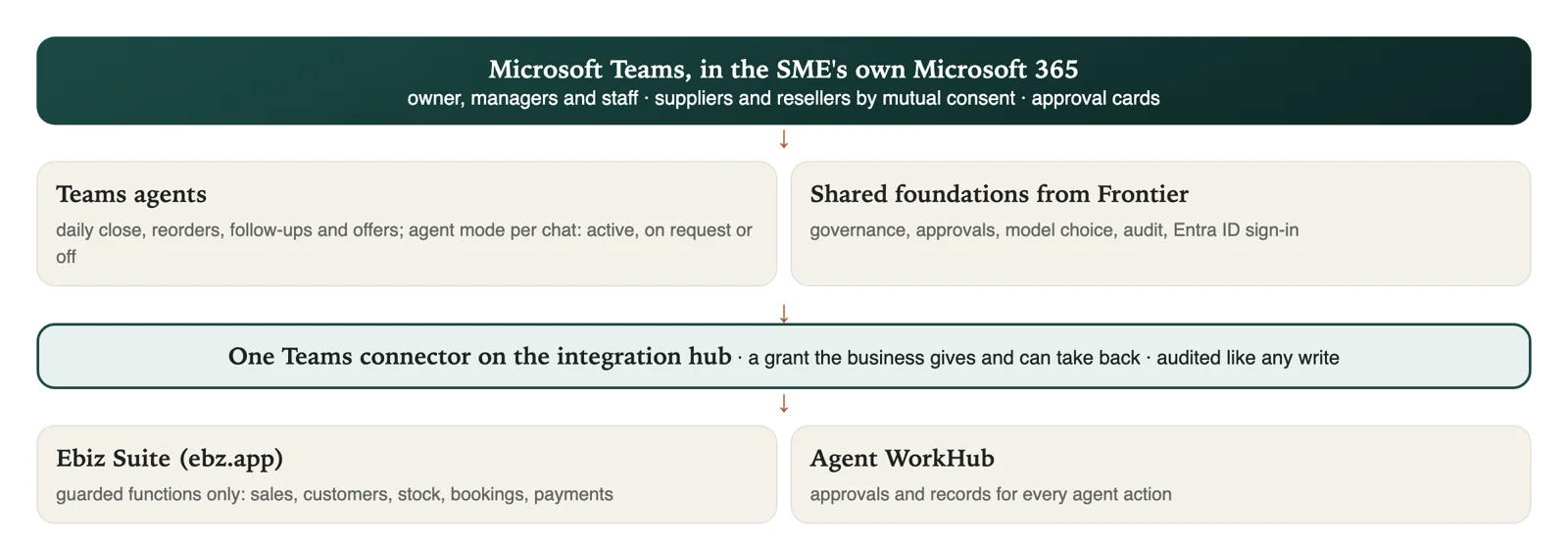
- Reads through the hub: sales, collections, customers, stock, bookings and payments, only within the business's grant.
- Proposes, never writes directly: a reorder, offer or reminder becomes a draft; only an approved action passes through Ebiz Suite's own checks.
- Same platform guarantees: tenant isolation, audit in the same commit, AI budgets and sealed fields come from the Secure Agent Platform under Ebiz Suite.
- Revocable at any time: switching the connection off stops every agent action on the business's data from that moment.
Part four: foundations both products share
13. Security, privacy and governance
- Identity and access: Entra ID, least privilege, and enforcement of each source's own permissions.
- Secrets: managed identities and Azure Key Vault; no keys in chats, cards, browser storage, URLs, telemetry or support tickets.
- Sensitive information: minimization, masking and authorized handling.
- Prompt injection: retrieved content and tool results treated as untrusted.
- Agent tools: explicit allowlists and policy checks.
- Financial operations: human approval tied to the exact action and parameters.
- Auditability: actions, approvals, evidence and correlation IDs recorded.
- Data residency: tenant, application and model processing locations assessed separately.
- Information governance: Microsoft Purview labels and retention stay with the customer, plus application controls.
Threat model. The design protects against prompt injection, malicious retrieved documents, tool escalation, tenant crossover, unapproved data egress and insecure gateway updates. Teams sign-in, delegated Microsoft Graph permissions, application permissions and Azure workload identity are kept distinct: an Entra sign-in is never an automatic grant to model inference, and tenant administrators approve the exact permissions and resource roles.
14. Multi-tenant isolation
- Tokens validated in full: issuer, audience, signature, expiry, scopes and tenant context.
- Tenant bound everywhere: every request, tool call, record and audit event carries the authenticated tenant; a tenant ID supplied only in a prompt is never trusted.
- Separate storage: tenant-scoped storage and encryption boundaries, with no cross-tenant search, caching or vector retrieval.
- Least-privilege Graph permissions: delegated or application, with documented consent and administrator approval paths.
- Credentials kept safe: customer access and refresh tokens in approved secure storage, never in logs or model prompts.
- Per-tenant controls: quotas, retention rules, configuration and audit access for each tenant, plus offboarding, consent revocation and verified deletion.
15. Deployment and trust models
The customer chooses where the agents and the AI model run. The Teams settings page is a user interface, not a security boundary, so each deployment documents its code host, identity, network path, secret store, model endpoint, and where prompts, documents and responses are processed.
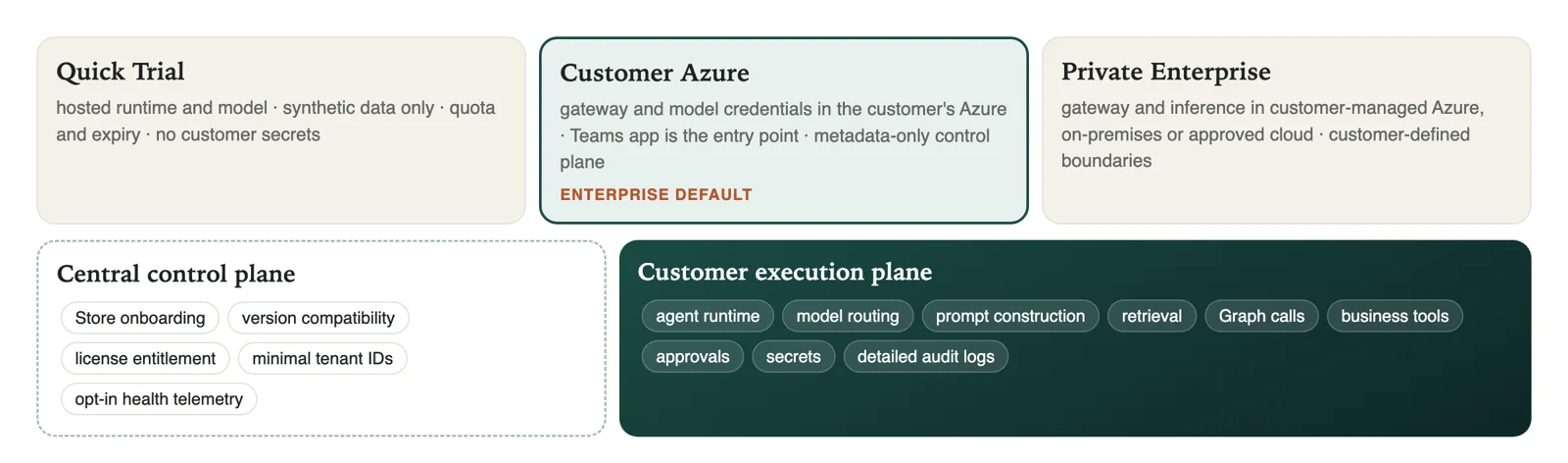
- Quick Trial: a hosted runtime and model with synthetic data only, a quota and an expiry; no customer secrets.
- Customer Azure (the enterprise default): the gateway and model credentials sit in the customer's Azure subscription; the Teams app is the entry point, and the control plane sees metadata only.
- Private Enterprise: the gateway and inference run in a customer-managed Azure, on-premises or approved cloud, inside the customer's own private boundaries.
- Control plane versus execution plane: the control plane holds only onboarding, version compatibility, license entitlement, minimal tenant identifiers and opt-in aggregated health telemetry. The agent runtime, model routing, prompt construction, retrieval, Graph calls, business tools, approvals, secrets and detailed audit logs stay in the customer's execution plane.
- Connectivity: supported Teams bot and tab patterns; tenant-scoped token validation with audience and issuer checks; workload authentication such as mTLS and replay protection; a defined gateway pairing, health check, revocation, update, rollback and emergency disable; and no arbitrary customer-entered URL as an outbound target, which protects against server-side request forgery.
16. Model choice: bring your own model
Customers configure AI connections inside Teams, under Organization Settings, and only authorized tenant administrators may change them. Secrets stay in the customer's own Key Vault or equivalent, and the publisher never stores plaintext keys or recoverable copies. Bringing your own model is not the same as data sovereignty, so the data path of each mode is stated explicitly.
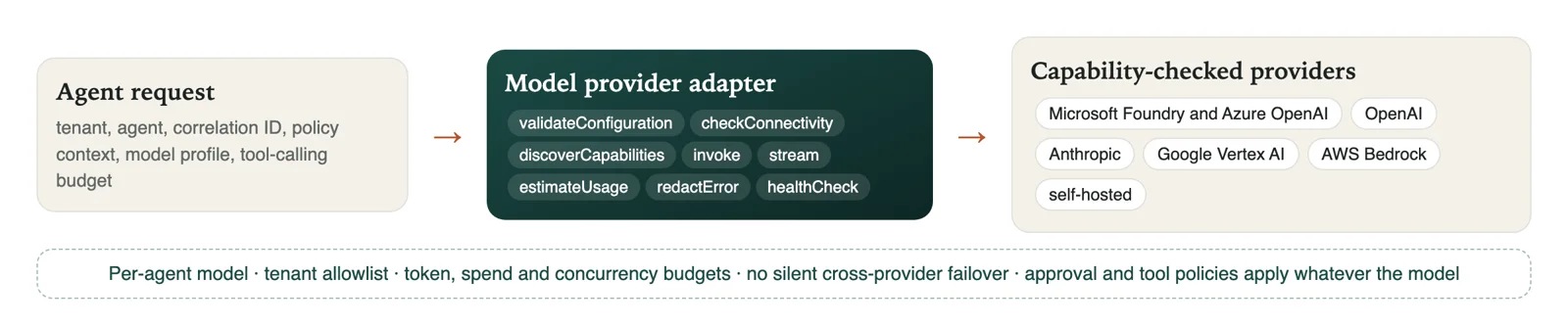
- One adapter contract: validate configuration, check connectivity, discover capabilities, invoke, stream, estimate usage, redact errors and health-check. Each request carries the tenant, agent, correlation ID, policy context, model profile and a tool-calling budget; each response returns the provider, deployment, usage, latency, finish reason and error class.
- Capability-based support: Microsoft Foundry and Azure OpenAI, OpenAI, Anthropic, Google Vertex AI, AWS Bedrock and self-hosted models, each validated for tool calling, structured output, context size, streaming, region and provider terms; an unsupported model is blocked or limited to read-only tasks.
- Routing and cost: a model per agent, tenant-approved allowlists, and token, spend and concurrency budgets.
- No silent failover: cross-provider failover is off by default, and any fallback that changes the data processor or region needs the customer's explicit policy.
- Repeatable testing: deterministic mock models for local development and evaluation.
17. Quality and release gates
- Tenant isolation: automated negative tests prove that one company cannot read or change another's records.
- Identity and consent: documented authentication flows, a Graph permission matrix and administrator-consent scenarios.
- Approval integrity: approval bound to the exact action, amount, target and parameters; a changed action needs approval again.
- Agent and tool security: prompt-injection tests, allowlisted tools, policy checks and escalation to people.
- Operational readiness: monitoring, an audit trace, rollback, incident response and a support process.
- Privacy: published policies, retention and deletion controls, and documented data flows.
Delivery approach. Product 1 is built in increments: tenant, permission and cost verification; the Teams shell, authentication design and synthetic data; the PMO agent with a grounded report and approval; the compliance agent with source-aware retrieval; the procurement agent with simulated transaction approval; the vendor management agent; the project manager assistant; controlled cross-agent workflow; and hardening for security, evaluation, monitoring and deployment. Product 2 then adds the integration hub connector and Agent WorkHub's approvals and records on the same foundations. Security, tests and observability start in the first increment, not at the end. Demonstrations use synthetic data only.
18. Technology stack
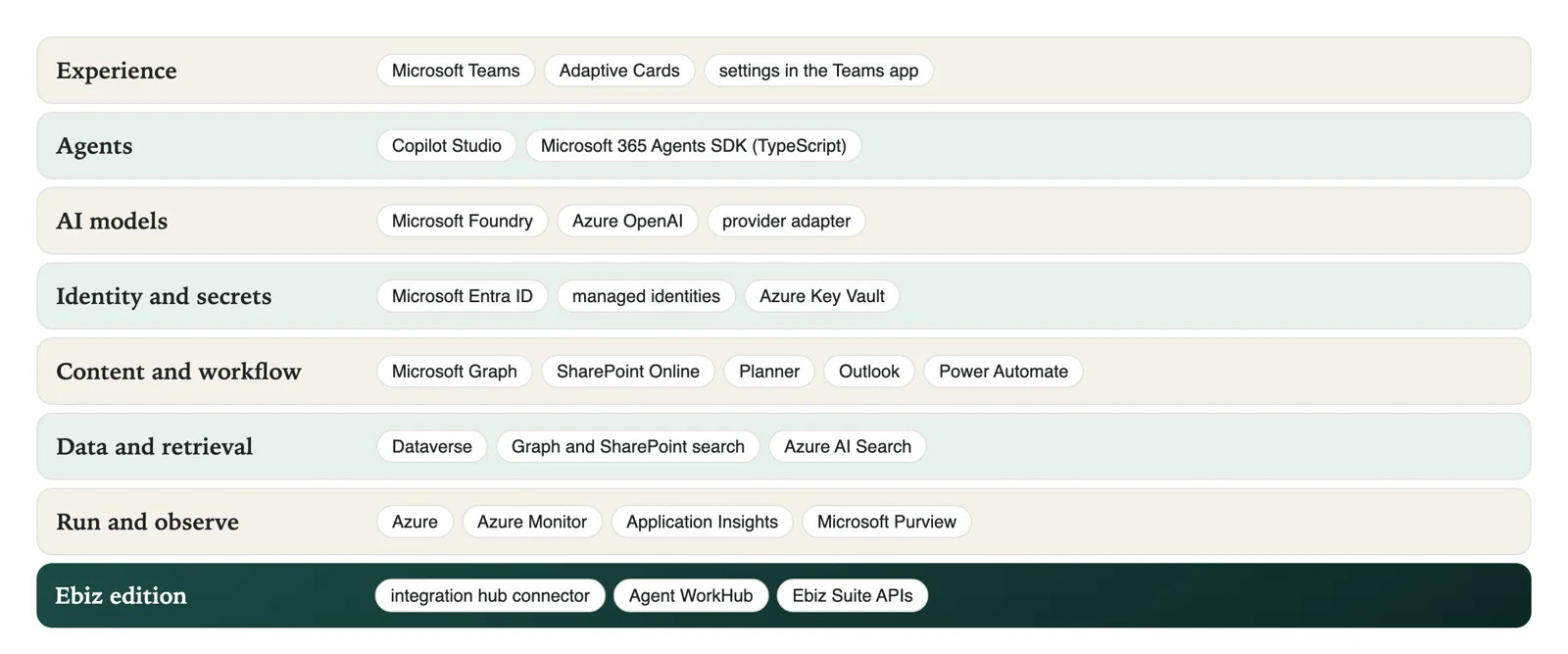
- User interface: Microsoft Teams and Adaptive Cards, with settings inside the Teams app.
- Agents: Microsoft Copilot Studio (low-code) and the Microsoft 365 Agents SDK in TypeScript (pro-code).
- AI models: Microsoft Foundry and Azure OpenAI by default, with a provider adapter for approved alternatives.
- Identity: Microsoft Entra ID, managed identities and Azure Key Vault.
- Enterprise content: SharePoint Online, Planner and Outlook through Microsoft Graph.
- Workflow: Power Automate and approval services.
- Business data: Dataverse, with a development database for local work.
- Hosting and monitoring: Azure, with Azure Monitor and Application Insights.
- Information governance: Microsoft Purview, plus application controls.
- Retrieval: Microsoft Graph and SharePoint search, with Azure AI Search where justified.
- Ebiz edition: a Teams connector on the Secure Agent Platform integration hub, with Agent WorkHub for approvals and records.
Questions a new reader often asks
Questions
Does the agent see everything in our Microsoft 365?
No. It sees only the sites, lists and mailboxes on its permission list, and only what the signed-in user could see anyway.
Could it send an email or a purchase order by mistake?
Sending is an action that always goes through an approval card first, bound to the exact message or order. Without a person tapping Approve, nothing is sent.
Can we use our own AI model?
Yes. Microsoft Foundry and Azure OpenAI are the default, and an administrator can connect another approved provider with credentials kept in the customer's own Key Vault.
Where is our data processed?
In the Customer Azure and Private Enterprise modes, prompts, documents, responses, secrets and detailed audit stay in the customer's execution plane; the control plane sees metadata only. Each deployment documents its exact data path.
Is our data used to train AI models?
The design uses models under the customer's own agreement and keeps data inside its environment. Data is not used to train models.
How is this different from Microsoft 365 Copilot?
Copilot is a general assistant. These are specific agents for specific PMO and small-business jobs, with fixed sources, fixed steps and an approval for every action that matters.
Glossary
- AI agent: a program that uses AI to complete a multi-step task, within limits.
- Approval card: a small form in Teams with Approve, Edit and Reject buttons.
- Copilot Studio: Microsoft's tool for building agents that live in Teams.
- Entra ID: Microsoft's sign-in and identity service for organizations.
- Execution plane: where the agents, model calls, secrets and detailed audit run, in the customer's environment.
- Least privilege: giving each agent or person only the access its job needs.
- PMO: Program Management Office, the team that keeps many projects on track.
- RAID log: a list of a project's risks, actions, issues and decisions.
- RAG: retrieval-augmented generation: answering from retrieved, cited sources.
- Tenant (Microsoft 365): an organization's own private space in Microsoft 365.
*Companion articles: "Ebiz Suite", "ebz.app" and "Secure Agent Platform". All examples use made-up organizations and figures. © 2026 Srini Ramakichenane, Singapore.*